
 PootyTang PootyTang |

  |

| ScarFace |
 01/21/06 6:58pm 01/21/06 6:58pm
Post
#1
|
 Major  Group: {MOB} Posts: 594 Joined: November 2nd 2003 Member No.: 495  |
 Note how the edges of the render appear to be very blocky. I've made some attempts to clean this up but I've had no luck. I've had this issue when I done transperencies in the past. Would someone be so kind as to enlighten me as how I should go about solving this problem. --------------------  , ,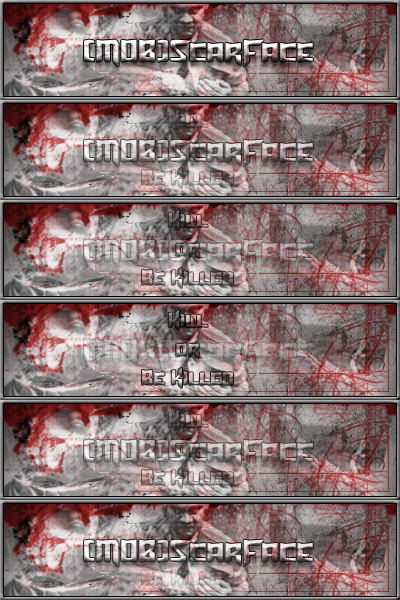 , , |
   |

 
|
| Ice_Cold |
01/21/06 7:02pm
Post
#2
|
 Colonel  Group: Forum Member Posts: 1285 Joined: November 9th 2003 From: Sioux Falls, South Dakota Member No.: 500 Xfire: hoodsiceman |
nice as always scar
-------------------- "He who makes a beast out of himslf, gets rid of the pain of being a man" Bat Country, Avenged Sevenfold
|
|
|
|
| XYZ Factor |
01/21/06 9:22pm
Post
#3
|
 Major  Group: {MOB} Regs Posts: 805 Joined: October 26th 2004 From: Louisiana--Coon Ass Country Member No.: 944 |
Its tough with .gif format
only suggestion I have is putting a stroke around it to smooth it out a bit...maybe black or silver. Looks good though! This post has been edited by XYZ Factor: 01/21/06 9:22pm --------------------  "Difficulties come and they pass, but it is a shame that sometimes these difficulties must pass like diarrhea" |
|
|
|
| Jekyl |
01/21/06 11:12pm
Post
#4
|
 First Lieutenant Group: {MOB} Posts: 112 Joined: December 13th 2004 Member No.: 989 Xfire: mobjekyl |
You might try taking a softbrush maybe size 10-20 and use the smudge, go around the edges a little bit. might smooth it out also.
--------------------   |
|
|
|
| little old man |
01/22/06 12:17am
Post
#5
|
 Major General Group: Forum Member Posts: 1801 Joined: August 25th 2002 Member No.: 35 |
Scar its always a problem.When people do Sig's outside the border what they try to do is remove all light pixels on the edges so as not to get those little white areas we see.This sometimes distorts the image.What you might want to try is the clone tool and blend them with the nearest darker color.You might also try PNG format
-------------------- |
|
|
|
| Axel |
01/23/06 7:42pm
Post
#6
|
 Second Lieutenant Group: Banned Posts: 311 Joined: December 26th 2004 From: North Carolina, America Member No.: 1002 Xfire: ncjames |
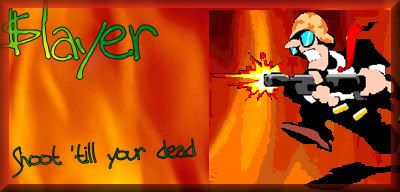
those things are kinda hard.....this is the first one ive ever done:
 its for a game called command and conquer generals.... -------------------- For old times: Thanks Gene, long live MoH:AA!
 'From this day to the ending of the world, But we in it shall be remembered- We few, we happy few, we band of brothers; For he to-day that sheds his blood with me Shall be my brother' -Shakespeare |
|
|
|
|
1 User(s) are reading this topic (1 Guests and 0 Anonymous Users)
0 Members:


|
Lo-Fi Version | Time is now: 05/04/26 8:00pm |
Invision Power Board
© 2026 IPS, Inc.