
 Problem with MOH Problem with MOH |


| Blakjak |
 04/17/04 11:14pm 04/17/04 11:14pm
Post
#1
|
|
Major  Group: Forum Member Posts: 744 Joined: October 12th 2003 Member No.: 479  |
After installing XP and reinstalling MOH I have not been able to get it running. Here is a ss I took showing the console error.
Attached image(s) 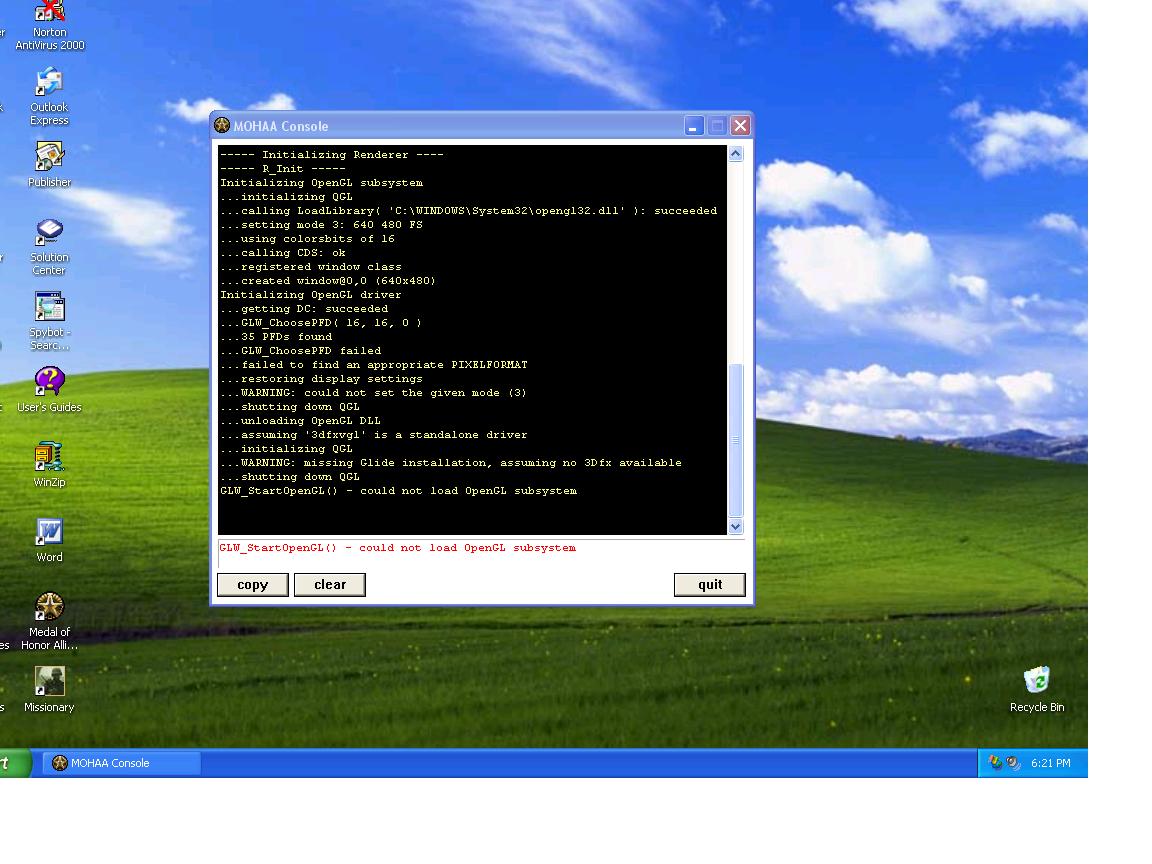
--------------------  |
   |

 
|
  |
Replies(1 - 7)
| Epacy |
04/17/04 11:20pm
Post
#2
|
 Major General Group: Forum Member Posts: 2029 Joined: August 3rd 2002 From: O'Fallon, IL Member No.: 21 |
I got that once. It was because I turned down my video card settings to far and turned off Open GL. Double check the new installation of XP correctly identified your video card and you have the latest drivers.
--------------------  |
|
|
|
| Blakjak |
04/17/04 11:30pm
Post
#3
|
|
Major Group: Forum Member Posts: 744 Joined: October 12th 2003 Member No.: 479 |
ok thank you ep, i will fool with it later
-------------------- |
|
|
|
| Blakjak |
04/18/04 10:25am
Post
#4
|
|
Major Group: Forum Member Posts: 744 Joined: October 12th 2003 Member No.: 479 |
Could someone please tell me where I can go to fix this problem. Ep I tried looking for a way to change my vid card settings for almost 30 minutes last night to no avail. I think I'm just skipping over something very obvious.
-------------------- |
|
|
|
| Himmler |
04/18/04 10:43am
Post
#5
|
|
Second Lieutenant Group: Forum Member Posts: 309 Joined: February 18th 2004 Member No.: 620 |
I think you need to update your drivers......Or just take out your Hacks....Just kidding man.....LOL
This post has been edited by Himmler: 04/18/04 10:44am |
|
|
|
| cypher |
04/18/04 11:34am
Post
#6
|
 Colonel Group: Forum Member Posts: 1297 Joined: August 18th 2002 From: Orange County, CA Member No.: 31 |
Himmler is correct. If you are using a VIA chipset, install the 4-in-1's, then install the latest nVidia or ATI drivers.
Cypher |
|
|
|
| Blakjak |
04/18/04 12:40pm
Post
#7
|
|
Major Group: Forum Member Posts: 744 Joined: October 12th 2003 Member No.: 479 |
I know I need to update my drivers but I'm just a little wary of doing it because the last time I did a number on my computer because the old driver version did not uninstall correctly... any tips? The drivers are the problem because there is a compatability issue I discovered on nvidia's website. I am really puzzled because the nvidia driver program is not showing up in my add/remove program window. Just deleting the folder is not gonna do it I don't think.
-------------------- |
|
|
|
| Blakjak |
04/18/04 12:50pm
Post
#8
|
|
Major Group: Forum Member Posts: 744 Joined: October 12th 2003 Member No.: 479 |
nm guys i go it running thanx for the help
-------------------- |
|
|
|
|
1 User(s) are reading this topic (1 Guests and 0 Anonymous Users)
0 Members:

|
Lo-Fi Version | Time is now: 05/04/26 4:24am |
Invision Power Board
© 2026 IPS, Inc.